 dc
be8d92f439
dc
be8d92f439
The adapter sends _debug=128 (not 131) on the Viya web JES path when
runAsTask is enabled, which is what the frontend uses there. Document
that value alongside 131, and note that editors/loadfile is reached
through the multipart file upload, which carries no input tables.
11 KiB
layout, title, description, og_image
| layout | title | description | og_image |
|---|---|---|---|
| article | Troubleshooting | Descriptions of common issues when working with Data Controller, and steps for resolution. | https://docs.datacontroller.io/img/cannotimport.png |
Data Controller for SAS® - Troubleshooting
Overview
Let us know if you experience an installation problem that is not described here!
max number of active processes has been reached for the user
On Viya versions 2025 or later you may get the following message in the network response:
Unable to create compute server session. Unable to complete the launch request, max number of active processes has been reached for the user: user=USERNAME limit=10
This limit should be set to at least 20 or 30 due to the way the sasjs/adapter works (by prelaunching sessions to improve responsiveness).
A guide for making the configuration change is available here.
Internet Explorer - blank screen
If you have an older, or 'locked down' version of Internet Explorer you may get a blank / white screen when navigating to the Data Controller url. To fix this, click settings (cog icon in top right), Compatibility View settings, and uncheck Display intranet sites in Compatibility view as follows:

Workspace Server Type Only
Data Controller requires the OS account to have disk write privileges for a number of reasons:
- log capture
- folder creation (initial setup)
- table creation (demo version)
- writing staging data (editors)
- updating databases / datasets (approvers)
On Viya, this is the default case.
On SAS 9, if your Stored Process Shared Server account (typically sassrv) is unavailable, or overly restricted, you may need to use a Workspace Server account for your STPs. This means that your Approvers must have the requisite access to perform the database updates.
The imported version of Data Controller is set up to work with the Stored Process Server. To switch this to Workspace Server, you can run the following code after importing the SPK:
/* get the macros (or download / %include seperately) */
filename mc url "https://raw.githubusercontent.com/sasjs/core/main/all.sas";
%inc mc;

/* put the path to your Data Controller folder here */
%let DCROOT=/YOUR/META/PATH/DataController;

/* this will extract all the objects in that folder */
%mm_getfoldertree(root=&dcroot, outds=stps)

/* this creates the program to update all the STPs in that folder */
filename tmp temp;
data _null_;
  set stps;
  file tmp;
  if publictype='StoredProcess' then do;
  str=cats('%mm_updatestpservertype(target='
   ,path,'/',name,',type=WKS)');
  put str;
  end;
run;

/* run the program */
%inc tmp;
Custom Library
If you wish to change the default libref or libname then there are TWO items to configure:
-
The library itself
-
The
mpelibmacro variable and the libname statement in the/Admin/Data_Controller_Settingsstored process.
!!! note Be sure to make this change after running the configurator, to ensure the tables are first registered!
Permission is needed to access the ServerContext Object
After a successful install, your business user may see the following message:

Error obtaining stored process from repository
Permission is needed to access the ServerContext object attached to the stored process.
The reason is that the context chosen when importing the SPK (perhaps, SASApp) is not available to your business user. It's likely you have multiple contexts.
The SPK must be re-imported with the correct context chosen. This may require regenerating the tables, or adjusting the permissions, if the new context uses a different system account.
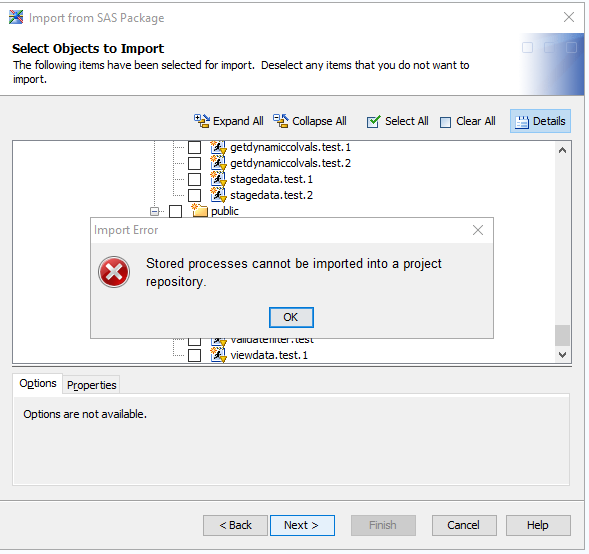
Stored Processes Cannot Be Imported Into A Project Repository
During the SPK import on a SAS 9 instance you may see the following dialog:

Stored processes cannot be imported into a project repository
This can happen when importing with Data Integration Studio and your user profile is making use of a personal project repository. Try re-connecting with the Foundation repository, or import with SAS Management Console (which does not support project repositories).
There is no LogicalServer of the type requested associated with the ServerContext in metadata.
This can happen if you enter the wrong serverName when deploying the SAS program on an EBI platform. Make sure it matches an existing Stored Process Server Context.
The error may also be thrown due to an encoding issue - changing to a UTF-8 server has helped at least one customer.
Displayed timestamps are in UTC (or the wrong timezone)
Data Controller records timestamps (such as the SUBMITTED column on the Submitted screen, and the audit history) using the SAS session clock, via the datetime() function. That function returns the time of the operating system, adjusted by the TIMEZONE= system option if it is set. The value is then displayed in the frontend exactly as stored, without conversion.
On Viya, the SAS compute sessions that run Data Controller jobs are started inside Kubernetes containers whose clock is UTC by default, and which inherit no timezone from the host machine. If the TIMEZONE= option is not set for the compute context used by Data Controller, every timestamp DC records and displays is UTC. Other SAS products can appear unaffected because clients such as SAS Studio create their own compute sessions and pass the browser timezone / locale, whereas Data Controller submits jobs to its own shared compute context, which gets the raw container clock.
To confirm the current state, run the following in a SAS session under the Data Controller compute context (or check the DC job log, where _DEBUG output shows the same values):
proc options option=timezone;
run;
%put &=SYSTIMEZONEIDENT &=SYSTIMEZONEOFFSET;
If TIMEZONE is blank (and SYSTIMEZONEOFFSET is 0), the session is on UTC. To fix it, ask your Viya administrator to set the timezone for the compute context used by Data Controller (in SAS Environment Manager, edit the context's Autoexec, or set the context's SAS options):
options timezone='Europe/Berlin';
Then recycle any existing compute sessions - hot sessions keep the old setting until they terminate.
!!! note
Use a region/area time zone ID such as Europe/Berlin rather than a fixed offset such as GMT+2. Fixed offsets do not follow daylight saving time, so the display would be 1 hour off in winter (CET = UTC+1).
!!! note Changing the timezone affects new timestamps only. Previously recorded submissions keep the UTC values that were stored when they were created.
Determining Application Version
The app version is bundled into the frontend during the release, and is visible by clicking your username in the top right.
You can also determine the app version (and SASjs Version, and build time) by opening browser Development Tools and running appinfo() in the console.
Support Diagnostics
The frontend sends two input tables with the startup service and with the services that execute customer-provided code - the hook scripts (pre/post edit and approve hooks) and the dynamic cell dropdown programs. They are available in those services as work.browser_info and work.browser_url_vars, so a support ticket can be diagnosed from the job log without asking the user follow-up questions, and a hook can adapt to its context. Other services do not receive them.
The services that receive the tables are: public/startupservice, editors/getdata, editors/getdynamiccolvals, editors/stagedata, editors/loadfile, editors/restore and auditors/postdata.
editors/loadfile is the exception in practice: the app reaches it through the adapter's file-upload call (multipart), which carries no input tables, so the service - and the post edit hook it runs - does not receive them in normal use. It is on the list for completeness, and would receive them if the service were ever invoked through the ordinary request path.
browser_info
A single-row table with these columns:
| Column | Description |
|---|---|
url |
The URL of the Data Controller page itself (the iframe), not the document embedding it. When the editor is embedded in a report, the embedding URL is visible here. |
referrer |
The embedding document, from document.referrer. For an embedded report this is the report URL, so the embedding report can be told apart from the editor URL. |
timezone |
The browser's IANA timezone name, e.g. Europe/Berlin. |
tz_offset |
The browser's UTC offset in minutes, as Date.getTimezoneOffset() returns it (positive west of UTC, so Europe/Berlin in summer is -120). |
locale |
The browser locale, e.g. en-GB. |
dc_version |
The Data Controller build, as shown by appinfo(). |
adapter_version |
The @sasjs/adapter version the client was built with. |
browser |
The browser family, parsed from the user agent. |
browser_version |
The browser version. |
platform |
The operating system, parsed from the user agent. |
user_agent |
The raw navigator.userAgent string. |
browser_url_vars
The page URL parameters as one row per parameter, so a SAS program can read a parameter by name rather than parse the url string:
| Column | Description |
|---|---|
name |
The URL parameter name. |
value |
The URL parameter value. |
Parameters from both the search string and the hash query string (Angular routes carry them after the #) are included; on a name collision the hash value wins. The table is sent only when the page URL has at least one parameter.
The values in both tables are supplied by the client, so treat them as diagnostics hints rather than a security boundary.
To see the tables, run any of the services above with debug on. The debug value depends on the path: &_debug=131 on the Compute API and SAS 9, or &_debug=128 on the Viya web (JES) path with runAsTask enabled - which is what the frontend sends there, so turning debug on in the app is enough. Either value makes the session initialisation write the tables to the job log:
NOTE: MPEINIT: work.browser_url_vars:
name=embed value=va
NOTE: MPEINIT: work.browser_info:
url=... referrer=... timezone=Europe/Berlin tz_offset=-120 locale=en-GB
dc_version=7.15.0 adapter_version=4.19.0 browser=Chrome browser_version=120.0
platform=Linux user_agent=...
A service called directly (for instance from a URL, or by a script), or by an older frontend, has no work.browser_info - the log then records that fact instead.